Check a creator's real numbers in Meta, for free.
Followers can be bought. Meta's own data can't. Here is how to open Meta Creator Marketing Hub, see where a creator's audience really lives, how many people their content reaches, and get permission to run their Reel as an ad. Step by step, with screenshots.
Four things to know.
So you don't get stuck halfway.
Your business must be verified
Meta asks brands to verify their business in Meta Business Suite first. You send official documents about your business and Meta checks them. This can take some time, so start early.
Not every creator is listed
A creator appears only if they have a professional account and have chosen to be open to brand partnerships. Smaller or private creators may not show up.
Screens can differ
Meta is still rolling this out and changes its screens often. Your menu or filters may look a little different from my screenshots.
It was Creator Marketplace
Meta combined Creator Marketplace and Partnership Ads Hub into one tool called Creator Marketing Hub. If you read older guides, that is the same place.
Your account must be verified first.
Without this, the hub may not open for you, or it shows very little. Tick off what you already have.
All four ticked? Go to the steps. Stuck at three or four? Wait for Meta's approval, it can take some time. Don't create a second business account to speed it up.

Look past the follower count.
Most brands pick an influencer by followers and a screenshot the creator sends. Inside the hub you can see Meta's own numbers instead.
- Followers, views and interactions for each creator, on Instagram and Facebook
- Where their followers live: top countries and cities
- Age and gender of their audience
- How many views come from people who don't follow them
- Their recent Reels, so you can judge the content, not just the number
- Creators with an audience similar to one you already like
- Permissions for running their video as a partnership ad
What each number really means.
Tap a number to read it in plain words. Meta's exact wording can change, so hover over the small i icon in the hub for its own definition.
Followers
What it is: how many people follow the creator. Careful: this is the easiest number to inflate, so never use it alone. Good sign: it roughly matches the views on their recent Reels.
Views
What it is: how many times their videos were watched in the period you picked. How to use it: compare it with followers. 100K followers but only 2K views on each Reel means most followers are not watching.
Interactions
What it is: roughly how many viewers did something: liked, commented, shared or saved. On the creator cards it shows as a percentage, like the 16% in the example. Good sign: higher than the other creators on your list. Careful: a high percentage on very few views doesn't prove much.
Hook rate
What it is: the share of people who keep watching after the first few seconds of a Reel, usually the first 3 seconds. It tells you if the creator's opening line or first shot grabs attention. How to use it: compare a creator's recent Reels with each other, and with your own. If you can't see it for a creator, ask them to share it from their own Instagram Insights.
Non-followers share
What it is: how much of their reach comes from people who don't follow them. Good sign: a high share means their content is pushed to new people, which is what a brand wants. In my example screenshot it was 98%.
Top countries and cities
What it is: where their followers live. This decides everything for a local business. A Kerala clinic gains nothing from an audience in Brazil or the US.
From verified business to checked creator.
Step 1 is a one-time setup. After that, repeat steps 3 to 6 for every creator you are thinking of hiring.
-
Verify your business in Meta Business Suite
Open Meta Business Suite and log in with the account that manages your Facebook Page and Instagram account. Meta shows a Verify your business prompt. Follow it and upload the business documents Meta asks for.
- Use your real, registered business name and address, the same on every document.
- Wait for Meta to approve it. Until then, the hub may not open for your account.
-
Open Creator Marketing Hub
Once your business is verified, look in the left-hand menu of Business Suite. Open the menu icon (three lines) at the bottom of the left strip, then choose Creator Marketing Hub. The hub has its own menu on the left: Discover creators, View saved creators, Manage permissions, Manage campaigns, Messages, and under Content, Browse content and Content lists.
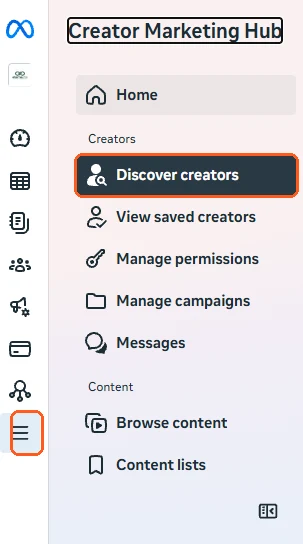
The menu icon and Discover creators are marked in orange. -
Find creators with Discover creators
Click Discover creators and search or use the filters on the page. Can't find a creator you know? They may not have opted in to brand partnerships. See why. A card for each creator shows followers, views and interactions, plus a few of their recent Reels. A creator may show numbers for only Instagram or only Facebook, as you can see below.
Found one you like? Open the similar audience row: Meta lists other creators whose audience looks like theirs. In the example, one creator has 84K followers, 90K views and 16% interactions. Use the Contact button to message them.
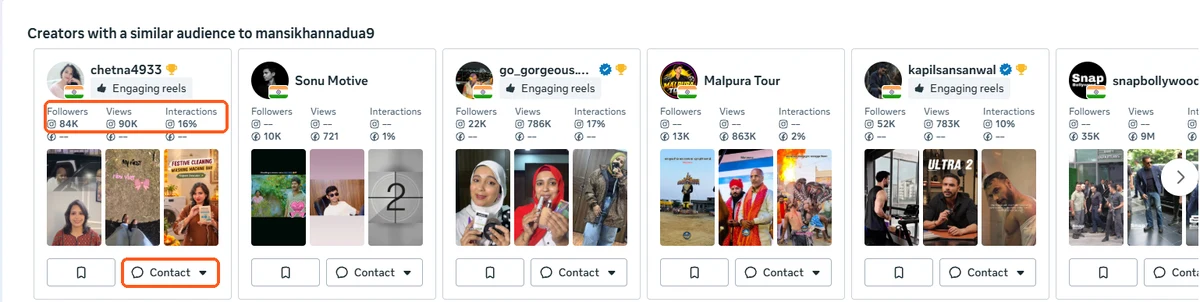
Example cards. The numbers row and the Contact button are marked. -
Check where their followers live
Open a creator's profile and scroll to Follower demographics. Read Top countries and Top cities first. This is the check most brands skip.
In the example below, the top country is India at 39.4%, followed by the United States at 17.2% and Brazil at 10.9%. The top city is Delhi at only 3.3%. For a business in Kerala or one city, most of this audience is not a customer. This is an example profile, so check the creator you are actually thinking of hiring.
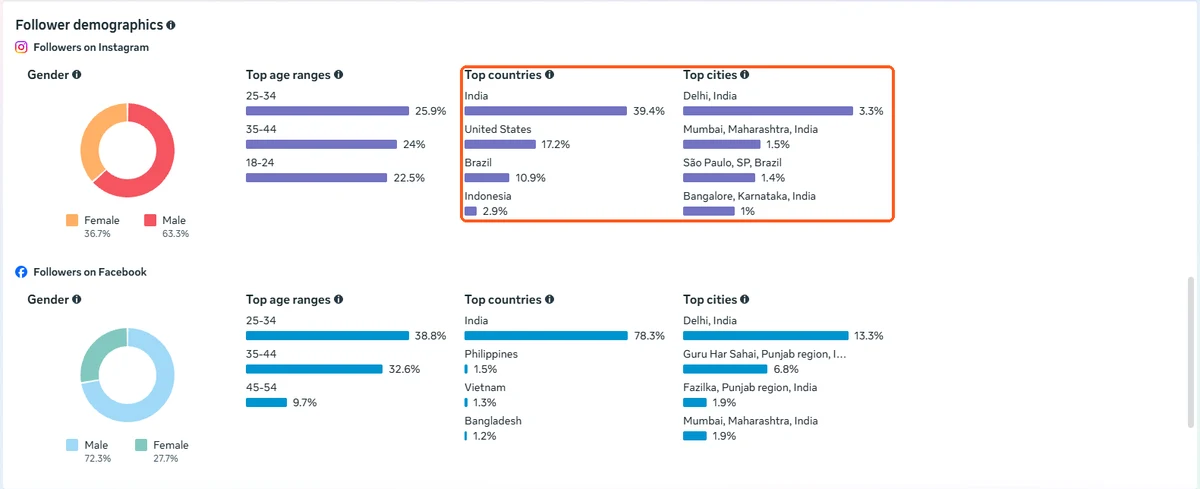
Example demographics. Top countries and Top cities are marked. -
Check views and how many are non-followers
Scroll to Insights details. Pick a date range, like the last 30 days. Look at total views and the split between followers and non-followers.
In the example, Instagram shows 1.3M total views in 30 days, with 98% from non-followers and 2% from followers. That means the content reaches new people, not only the creator's own followers. Also look at the line graph: steady reach is a better sign than one spike.
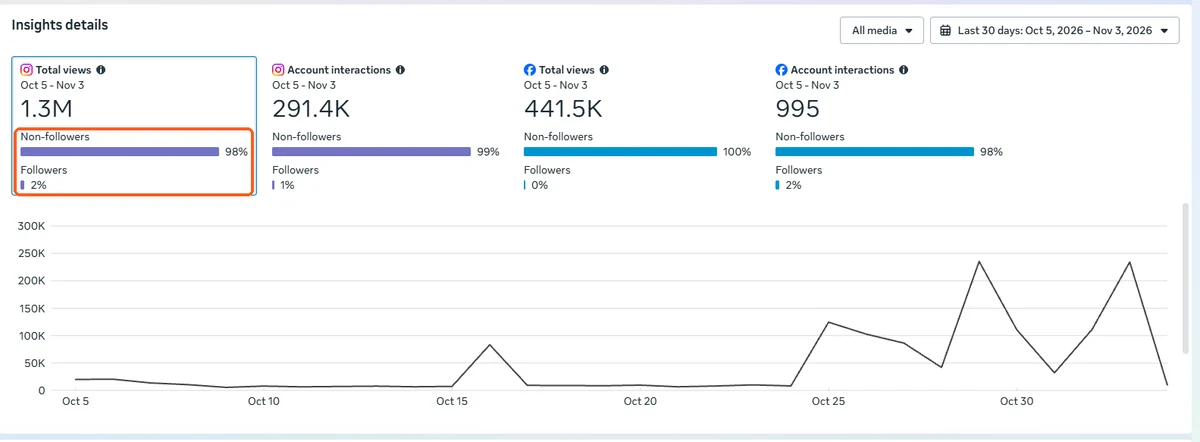
Example insights. The Non-followers / Followers split is marked. -
Save creators into lists
Tap the bookmark on a creator card to save them. Under View saved creators you can make your own lists with New list, or Upload list if you already have names. Meta also makes lists for you: Top performing in your partnership ads, Previous partnerships, Interested creators, Creators that follow you and Creators that recently tagged you.
The last two are worth a look. People who already follow or tag your brand are often cheaper and more natural to work with.
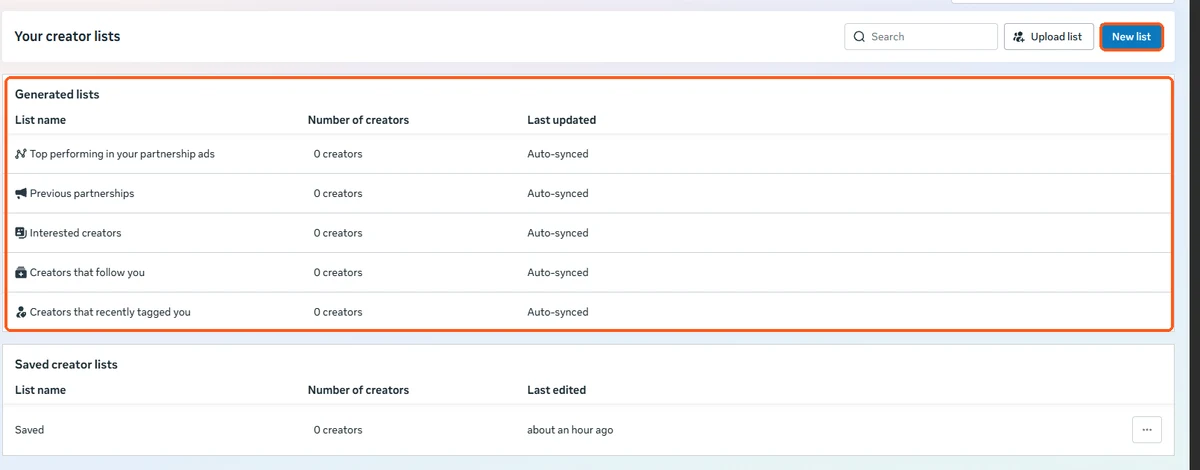
New list and the lists Meta generates for you are marked. -
Get permission to run their Reel as an ad
After the collab, you can run the same video as a partnership ad from the creator's account. For that you need their permission. Go to Manage permissions.
- Add partnership sends a request to the creator.
- Sent requests shows who you asked, and Received requests shows requests sent to you.
- The Status column should say Active before you run the ad.
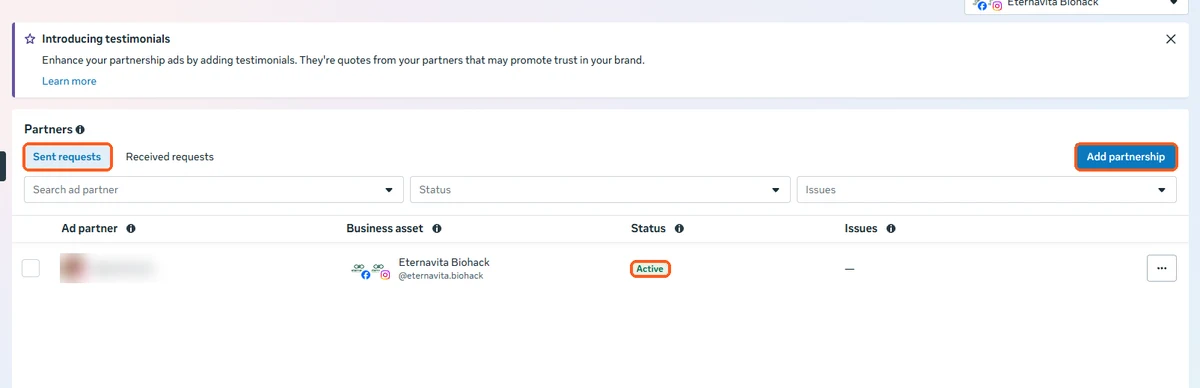
Add partnership, the request tabs and the Active status are marked. The creator's name is blurred. Don't wait until after the shoot to ask. See the next section.
Can't find the creator? Read this.
This confuses almost everyone the first time. Not finding a creator in the hub does not mean they are bad.
I searched their name and they don't appear
The hub only lists creators who have a professional account (Creator or Business) and have opted in to brand partnerships. If they haven't, you won't see them even if they have a million followers. Other reasons: the creator is under 18, or their country isn't supported yet.
The card shows "--" for some numbers
A dash means Meta has no data to show for that platform. It does not mean zero. A creator may show Instagram numbers but not Facebook, or the other way round.
I see the creator but no audience details
Some creators show fewer details. Ask them to share their own Instagram Insights on a screen-share call. Remember that a screenshot can be edited, so a live screen-share is safer.
What should I do next?
Message the creator on Instagram and ask two things: 1) Are you on a professional account? 2) Can you turn on brand partnerships so I can see your data in Meta? If they say no, treat their numbers as unchecked and decide with that in mind.
Put ad usage in the agreement.
Permission for partnership ads is something the creator gives, so agree on it before the shoot, not after.
How many days
For how long can you run the video as an ad? Write the number of days or months.
Can you edit it
Can you cut it shorter, change the caption or add text? Write what is allowed.
What it costs
Is ad usage included in the fee, or charged separately? Creators, it's fair to charge for it separately.
Keep it in writing
A message on WhatsApp or a short agreement is fine. What matters is that both sides agreed before the video was made.
What to look at, and why.
| Check | Where in the hub | What it tells you |
|---|---|---|
| Followers, views, interactions | Discover creators | Whether the numbers match the follower count |
| Top countries and cities | Follower demographics | Whether their audience can become your customers |
| Non-followers share | Insights details | Whether their content reaches new people |
| Recent Reels | Creator card or Browse content | Whether their style fits your brand |
| Partnership permission | Manage permissions | Whether you can run their video as an ad |
Planning Meta ads around creator content? See how I work on Meta Ads in Kerala, or read about Meta Ads for clinics.
The straight answers.
Is Meta's Creator Marketing Hub free to use?
Looking up creators and checking their data is free. You only pay for what you do afterwards, such as the creator's fee and any ad budget you spend on a partnership ad.
Do I need a verified business to use it?
Brands are generally asked to have a verified business in Meta Business Suite before they can use it. Verification means sending Meta official documents about your business. Meta decides what it accepts and how long it takes.
Why can't I see some creators?
A creator only shows up if they have a professional (Creator or Business) account and have chosen to be open to brand partnerships. Some creators also show no numbers for one of their platforms, as you can see in the screenshots.
What is hook rate?
Hook rate is the share of people who keep watching after the first few seconds of a Reel, usually the first 3 seconds. It shows whether the opening grabs attention. If you can't see it for a creator, ask them to share it from their own Instagram Insights.
I searched a creator by name and can't find them. Why?
Usually they have not opted in to brand partnerships, or they use a personal account instead of a professional one. It does not mean they are a bad creator. Message them on Instagram and ask them to switch to a professional account and turn on brand partnerships.
Is this the same as Creator Marketplace?
It started as Creator Marketplace. Meta then combined it with its Partnership Ads Hub and now calls it Creator Marketing Hub. The steps and screens in this guide are from the Creator Marketing Hub.
Can I run a creator's Reel as an ad?
Yes, as a partnership ad, but you need the creator's permission first. Ask for it before the shoot and write the ad usage terms in your agreement: how many days, whether you can edit the video, and what it costs.